How to Recommend Sizes Based on Measurements
Recommending the right size in a RevenueHunt quiz - for bras, clothing, footwear, or any fit-based product - requires a structured approach. This guide explains why open-ended measurement inputs won't work, how to design questions that produce accurate size recommendations using the voting system, and what alternatives exist if you need precise numerical calculations.
Recommending the right size in a RevenueHunt quiz - for bras, clothing, footwear, or any fit-based product - requires a structured approach. This guide explains why open-ended measurement inputs won't work, how to design questions that produce accurate size recommendations using the voting system, and what alternatives exist if you need precise numerical calculations.
Recommending the right size in a RevenueHunt quiz - for bras, clothing, footwear, or any fit-based product - requires a structured approach. This guide explains why open-ended measurement inputs won't work, how to design questions that produce accurate size recommendations using the voting system, and what alternatives exist if you need precise numerical calculations.
Recommending the right size in a RevenueHunt quiz - for bras, clothing, footwear, or any fit-based product - requires a structured approach. This guide explains why open-ended measurement inputs won't work, how to design questions that produce accurate size recommendations using the voting system, and what alternatives exist if you need precise numerical calculations.
Recommending the right size in a RevenueHunt quiz - for bras, clothing, footwear, or any fit-based product - requires a structured approach. This guide explains why open-ended measurement inputs won't work, how to design questions that produce accurate size recommendations using the voting system, and what alternatives exist if you need precise numerical calculations.
Recommending the right size in a RevenueHunt quiz - for bras, clothing, footwear, or any fit-based product - requires a structured approach. This guide explains why open-ended measurement inputs won't work, how to design questions that produce accurate size recommendations using the voting system, and what alternatives exist if you need precise numerical calculations.
Why Open-Ended Questions Won't Work
It might seem natural to ask customers to type in their exact measurements - "Enter your underbust measurement in inches" - and use that number to return a size. But open-ended Number questions don't support product recommendations.
The quiz recommendation engine works by linking each answer choice to a fixed list of products. When a customer selects that answer, every product in the list receives one vote. The product with the most votes at the end is recommended.
A typed number cannot be linked to anything in advance. Because users can enter any value, there is no way to assign a product list to every possible number they might type. The voting system has nothing to count.
This applies to any question where the answer is unpredictable - exact measurements, dates, free-text input. To recommend products, every possible answer must be defined by you before the quiz goes live.
Why can't I use open-ended inputs for size recommendations?
Open-ended number fields let customers type any value, so it's impossible to link those answers to specific products. You need predefined choices instead. Learn more in Recommend Products Based on Numerical Inputs.
It might seem natural to ask customers to type in their exact measurements - "Enter your underbust measurement in inches" - and use that number to return a size. But open-ended Number questions don't support product recommendations.
The quiz recommendation engine works by linking each answer choice to a fixed list of products. When a customer selects that answer, every product in the list receives one vote. The product with the most votes at the end is recommended.
A typed number cannot be linked to anything in advance. Because users can enter any value, there is no way to assign a product list to every possible number they might type. The voting system has nothing to count.
This applies to any question where the answer is unpredictable - exact measurements, dates, free-text input. To recommend products, every possible answer must be defined by you before the quiz goes live.
It might seem natural to ask customers to type in their exact measurements - "Enter your underbust measurement in inches" - and use that number to return a size. But open-ended Number questions don't support product recommendations.
The quiz recommendation engine works by linking each answer choice to a fixed list of products. When a customer selects that answer, every product in the list receives one vote. The product with the most votes at the end is recommended.
A typed number cannot be linked to anything in advance. Because users can enter any value, there is no way to assign a product list to every possible number they might type. The voting system has nothing to count.
This applies to any question where the answer is unpredictable - exact measurements, dates, free-text input. To recommend products, every possible answer must be defined by you before the quiz goes live.
It might seem natural to ask customers to type in their exact measurements - "Enter your underbust measurement in inches" - and use that number to return a size. But open-ended Number questions don't support product recommendations.
The quiz recommendation engine works by linking each answer choice to a fixed list of products. When a customer selects that answer, every product in the list receives one vote. The product with the most votes at the end is recommended.
A typed number cannot be linked to anything in advance. Because users can enter any value, there is no way to assign a product list to every possible number they might type. The voting system has nothing to count.
This applies to any question where the answer is unpredictable - exact measurements, dates, free-text input. To recommend products, every possible answer must be defined by you before the quiz goes live.
It might seem natural to ask customers to type in their exact measurements - "Enter your underbust measurement in inches" - and use that number to return a size. But open-ended Number questions don't support product recommendations.
The quiz recommendation engine works by linking each answer choice to a fixed list of products. When a customer selects that answer, every product in the list receives one vote. The product with the most votes at the end is recommended.
A typed number cannot be linked to anything in advance. Because users can enter any value, there is no way to assign a product list to every possible number they might type. The voting system has nothing to count.
This applies to any question where the answer is unpredictable - exact measurements, dates, free-text input. To recommend products, every possible answer must be defined by you before the quiz goes live.
It might seem natural to ask customers to type in their exact measurements - "Enter your underbust measurement in inches" - and use that number to return a size. But open-ended Number questions don't support product recommendations.
The quiz recommendation engine works by linking each answer choice to a fixed list of products. When a customer selects that answer, every product in the list receives one vote. The product with the most votes at the end is recommended.
A typed number cannot be linked to anything in advance. Because users can enter any value, there is no way to assign a product list to every possible number they might type. The voting system has nothing to count.
This applies to any question where the answer is unpredictable - exact measurements, dates, free-text input. To recommend products, every possible answer must be defined by you before the quiz goes live.
Use Ranges Instead of Exact Numbers
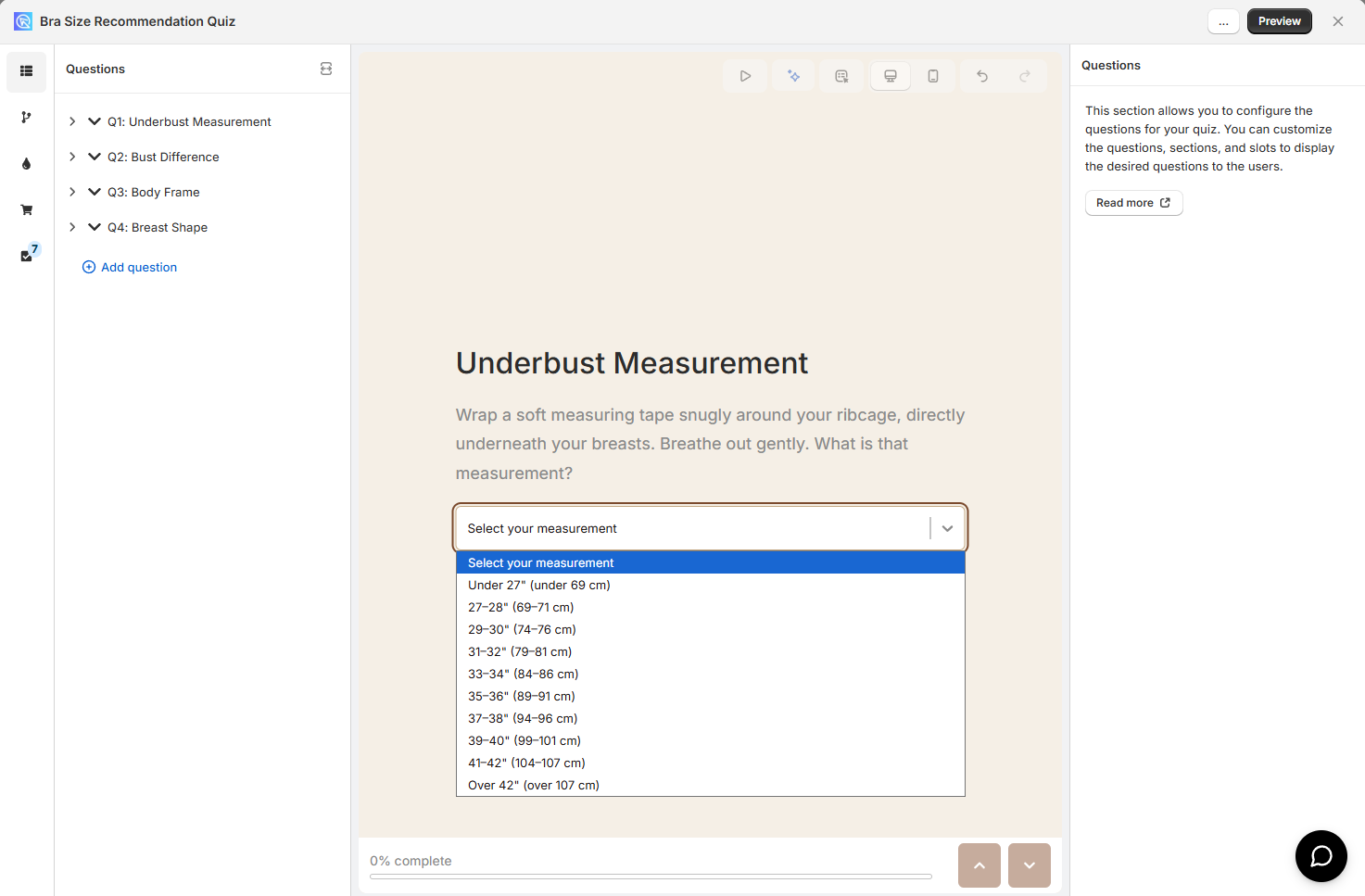
To make size recommendations work, replace any measurement input with a dropdown or multiple choice question. Instead of asking for an exact number, offer predefined measurement ranges as answer choices.
Example - Bra Size Quiz
Instead of "Enter your underbust measurement", use a dropdown:
- Under 27" / Under 69 cm
- 27–28" / 69–71 cm
- 29–30" / 74–76 cm
- 31–32" / 79–81 cm
- 33–34" / 84–86 cm
- 35–36" / 89–91 cm
Each option maps to a fixed band size. You can then upvote every product variant with that band to the choice.
Once you use finite answer choices, you can:
- Upvote specific products, variants, or collections to each choice
- Set up Jump Logic or Display Logic based on the customer's selection
Use Quiz Copilot to generate the choices for you
If you are working with a large number of size variants, you can use Quiz CoPilot to generate the choices for you.
Open Quiz Copilot from the quiz editor and share your product list and sizing logic. Ask it to generate the choices for you.
Copilot will generate the choices for you automatically and help match them to recommendations.
To make size recommendations work, replace any measurement input with a dropdown or multiple choice question. Instead of asking for an exact number, offer predefined measurement ranges as answer choices.
Example - Bra Size Quiz
Instead of "Enter your underbust measurement", use a dropdown:
- Under 27" / Under 69 cm
- 27–28" / 69–71 cm
- 29–30" / 74–76 cm
- 31–32" / 79–81 cm
- 33–34" / 84–86 cm
- 35–36" / 89–91 cm
Each option maps to a fixed band size. You can then upvote every product variant with that band to the choice.
Once you use finite answer choices, you can:
- Upvote specific products, variants, or collections to each choice
- Set up Jump Logic or Display Logic based on the customer's selection
To make size recommendations work, replace any measurement input with a dropdown or multiple choice question. Instead of asking for an exact number, offer predefined measurement ranges as answer choices.
Example - Bra Size Quiz
Instead of "Enter your underbust measurement", use a dropdown:
- Under 27" / Under 69 cm
- 27–28" / 69–71 cm
- 29–30" / 74–76 cm
- 31–32" / 79–81 cm
- 33–34" / 84–86 cm
- 35–36" / 89–91 cm
Each option maps to a fixed band size. You can then upvote every product variant with that band to the choice.
Once you use finite answer choices, you can:
- Upvote specific products, variants, or collections to each choice
- Set up Jump Logic or Display Logic based on the customer's selection
To make size recommendations work, replace any measurement input with a dropdown or multiple choice question. Instead of asking for an exact number, offer predefined measurement ranges as answer choices.
Example - Bra Size Quiz
Instead of "Enter your underbust measurement", use a dropdown:
- Under 27" / Under 69 cm
- 27–28" / 69–71 cm
- 29–30" / 74–76 cm
- 31–32" / 79–81 cm
- 33–34" / 84–86 cm
- 35–36" / 89–91 cm
Each option maps to a fixed band size. You can then upvote every product variant with that band to the choice.
Once you use finite answer choices, you can:
- Upvote specific products, variants, or collections to each choice
- Set up Jump Logic or Display Logic based on the customer's selection
To make size recommendations work, replace any measurement input with a dropdown or multiple choice question. Instead of asking for an exact number, offer predefined measurement ranges as answer choices.
Example - Bra Size Quiz
Instead of "Enter your underbust measurement", use a dropdown:
- Under 27" / Under 69 cm
- 27–28" / 69–71 cm
- 29–30" / 74–76 cm
- 31–32" / 79–81 cm
- 33–34" / 84–86 cm
- 35–36" / 89–91 cm
Each option maps to a fixed band size. You can then upvote every product variant with that band to the choice.
Once you use finite answer choices, you can:
- Upvote specific products, variants, or collections to each choice
- Set up Jump Logic or Display Logic based on the customer's selection
To make size recommendations work, replace any measurement input with a dropdown or multiple choice question. Instead of asking for an exact number, offer predefined measurement ranges as answer choices.
Example - Bra Size Quiz
Instead of "Enter your underbust measurement", use a dropdown:
- Under 27" / Under 69 cm
- 27–28" / 69–71 cm
- 29–30" / 74–76 cm
- 31–32" / 79–81 cm
- 33–34" / 84–86 cm
- 35–36" / 89–91 cm
Each option maps to a fixed band size. You can then upvote every product variant with that band to the choice.
Once you use finite answer choices, you can:
- Upvote specific products, variants, or collections to each choice
- Set up Jump Logic or Display Logic based on the customer's selection
Map Out Your Products Before You Start
Because every answer choice needs a pre-written list of product variants, you must know your full size catalogue before building a single question. The quiz engine assigns votes at setup time - not at the moment a customer responds. There is no way to assign products to an answer you haven't defined yet.
Before opening the quiz builder:
- List every size variant you carry (e.g. 28A, 28B … 44DD)
- Identify the attributes that determine size for your product (for bras: band and cup; for clothing: waist and hip; for shoes: length and width)
- Design one question per attribute, with dropdown options covering the full range of your catalogue
- For each answer option, write out which product variants it should vote for
Use an AI assistant to generate the mapping
If you carry many size variants, mapping them manually is tedious. Share your full product list with an AI assistant (like ChatGPT, Claude, or Gemini) and ask it to generate the mapping for you.
Try a prompt like:
"I sell bras in these sizes: [paste your size list]. I have two quiz questions - underbust measurement and bust difference. For each dropdown option, list every product variant that should receive a vote."
Because every answer choice needs a pre-written list of product variants, you must know your full size catalogue before building a single question. The quiz engine assigns votes at setup time - not at the moment a customer responds. There is no way to assign products to an answer you haven't defined yet.
Before opening the quiz builder:
- List every size variant you carry (e.g. 28A, 28B … 44DD)
- Identify the attributes that determine size for your product (for bras: band and cup; for clothing: waist and hip; for shoes: length and width)
- Design one question per attribute, with dropdown options covering the full range of your catalogue
- For each answer option, write out which product variants it should vote for
Use an AI assistant to generate the mapping
If you carry many size variants, mapping them manually is tedious. Share your full product list with an AI assistant (like ChatGPT, Claude, or Gemini) and ask it to generate the mapping for you.
Try a prompt like:
"I sell bras in these sizes: [paste your size list]. I have two quiz questions - underbust measurement and bust difference. For each dropdown option, list every product variant that should receive a vote."
Because every answer choice needs a pre-written list of product variants, you must know your full size catalogue before building a single question. The quiz engine assigns votes at setup time - not at the moment a customer responds. There is no way to assign products to an answer you haven't defined yet.
Before opening the quiz builder:
- List every size variant you carry (e.g. 28A, 28B … 44DD)
- Identify the attributes that determine size for your product (for bras: band and cup; for clothing: waist and hip; for shoes: length and width)
- Design one question per attribute, with dropdown options covering the full range of your catalogue
- For each answer option, write out which product variants it should vote for
Use an AI assistant to generate the mapping
If you carry many size variants, mapping them manually is tedious. Share your full product list with an AI assistant (like ChatGPT, Claude, or Gemini) and ask it to generate the mapping for you.
Try a prompt like:
"I sell bras in these sizes: [paste your size list]. I have two quiz questions - underbust measurement and bust difference. For each dropdown option, list every product variant that should receive a vote."
Because every answer choice needs a pre-written list of product variants, you must know your full size catalogue before building a single question. The quiz engine assigns votes at setup time - not at the moment a customer responds. There is no way to assign products to an answer you haven't defined yet.
Before opening the quiz builder:
- List every size variant you carry (e.g. 28A, 28B … 44DD)
- Identify the attributes that determine size for your product (for bras: band and cup; for clothing: waist and hip; for shoes: length and width)
- Design one question per attribute, with dropdown options covering the full range of your catalogue
- For each answer option, write out which product variants it should vote for
Use an AI assistant to generate the mapping
If you carry many size variants, mapping them manually is tedious. Share your full product list with an AI assistant and ask it to generate the mapping for you.
Try a prompt like:
"I sell bras in these sizes: [paste your size list]. I have two quiz questions - underbust measurement and bust difference. For each dropdown option, list every product variant that should receive a vote."
Because every answer choice needs a pre-written list of product variants, you must know your full size catalogue before building a single question. The quiz engine assigns votes at setup time - not at the moment a customer responds. There is no way to assign products to an answer you haven't defined yet.
Before opening the quiz builder:
- List every size variant you carry (e.g. 28A, 28B … 44DD)
- Identify the attributes that determine size for your product (for bras: band and cup; for clothing: waist and hip; for shoes: length and width)
- Design one question per attribute, with dropdown options covering the full range of your catalogue
- For each answer option, write out which product variants it should vote for
Use an AI assistant to generate the mapping
If you carry many size variants, mapping them manually is tedious. Share your full product list with an AI assistant (like ChatGPT, Claude, or Gemini) and ask it to generate the mapping for you.
Try a prompt like:
"I sell bras in these sizes: [paste your size list]. I have two quiz questions - underbust measurement and bust difference. For each dropdown option, list every product variant that should receive a vote."
Because every answer choice needs a pre-written list of product variants, you must know your full size catalogue before building a single question. The quiz engine assigns votes at setup time - not at the moment a customer responds. There is no way to assign products to an answer you haven't defined yet.
Before opening the quiz builder:
- List every size variant you carry (e.g. 28A, 28B … 44DD)
- Identify the attributes that determine size for your product (for bras: band and cup; for clothing: waist and hip; for shoes: length and width)
- Design one question per attribute, with dropdown options covering the full range of your catalogue
- For each answer option, write out which product variants it should vote for
Use an AI assistant to generate the mapping
If you carry many size variants, mapping them manually is tedious. Share your full product list with an AI assistant (like ChatGPT, Claude, or Gemini) and ask it to generate the mapping for you.
Try a prompt like:
"I sell bras in these sizes: [paste your size list]. I have two quiz questions - underbust measurement and bust difference. For each dropdown option, list every product variant that should receive a vote."
Add a Tiebreaker Question
Two well-designed measurement questions will produce a clear winner in most cases - but not always. When a customer's measurements sit exactly at the boundary between two sizes, two products can end up with the same vote count. Without a tiebreaker, the result is arbitrary.
A tiebreaker question must have two properties:
- Its answer is independent of every other question - it describes something about the customer that is true regardless of their measurements
- Its product list is fixed and absolute - it never changes based on what the customer answered elsewhere
Example - Body Frame as a Tiebreaker
For a bra quiz, "How would you describe your overall body frame?" works well:
- Petite / small frame → votes for all 28, 30, 32 band sizes
- Average / medium frame → votes for all 32, 34, 36 band sizes
- Athletic / muscular frame → votes for all 34, 36, 38 band sizes
- Plus / fuller frame → votes for all 38, 40, 42, 44 band sizes
These lists are written in advance and never change. The question is answerable without knowing anything about the customer's measurements.
Avoid questions whose answers depend on other questions
A question like "Does your current bra band feel too tight?" seems useful, but acting on it - "add a vote to the next band size up" - requires knowing what the first question answered. That is logic, not a static list, and it cannot exist in the voting system. Any tiebreaker question must be answerable in isolation, with a product list that is the same for every customer who picks that option.
Two well-designed measurement questions will produce a clear winner in most cases - but not always. When a customer's measurements sit exactly at the boundary between two sizes, two products can end up with the same vote count. Without a tiebreaker, the result is arbitrary.
A tiebreaker question must have two properties:
- Its answer is independent of every other question - it describes something about the customer that is true regardless of their measurements
- Its product list is fixed and absolute - it never changes based on what the customer answered elsewhere
Example - Body Frame as a Tiebreaker
For a bra quiz, "How would you describe your overall body frame?" works well:
- Petite / small frame → votes for all 28, 30, 32 band sizes
- Average / medium frame → votes for all 32, 34, 36 band sizes
- Athletic / muscular frame → votes for all 34, 36, 38 band sizes
- Plus / fuller frame → votes for all 38, 40, 42, 44 band sizes
These lists are written in advance and never change. The question is answerable without knowing anything about the customer's measurements.
Avoid questions whose answers depend on other questions
A question like "Does your current bra band feel too tight?" seems useful, but acting on it - "add a vote to the next band size up" - requires knowing what the first question answered. That is logic, not a static list, and it cannot exist in the voting system. Any tiebreaker question must be answerable in isolation, with a product list that is the same for every customer who picks that option.
Two well-designed measurement questions will produce a clear winner in most cases - but not always. When a customer's measurements sit exactly at the boundary between two sizes, two products can end up with the same vote count. Without a tiebreaker, the result is arbitrary.
A tiebreaker question must have two properties:
- Its answer is independent of every other question - it describes something about the customer that is true regardless of their measurements
- Its product list is fixed and absolute - it never changes based on what the customer answered elsewhere
Example - Body Frame as a Tiebreaker
For a bra quiz, "How would you describe your overall body frame?" works well:
- Petite / small frame → votes for all 28, 30, 32 band sizes
- Average / medium frame → votes for all 32, 34, 36 band sizes
- Athletic / muscular frame → votes for all 34, 36, 38 band sizes
- Plus / fuller frame → votes for all 38, 40, 42, 44 band sizes
These lists are written in advance and never change. The question is answerable without knowing anything about the customer's measurements.
Avoid questions whose answers depend on other questions
A question like "Does your current bra band feel too tight?" seems useful, but acting on it - "add a vote to the next band size up" - requires knowing what the first question answered. That is logic, not a static list, and it cannot exist in the voting system. Any tiebreaker question must be answerable in isolation, with a product list that is the same for every customer who picks that option.
Two well-designed measurement questions will produce a clear winner in most cases - but not always. When a customer's measurements sit exactly at the boundary between two sizes, two products can end up with the same vote count. Without a tiebreaker, the result is arbitrary.
A tiebreaker question must have two properties:
- Its answer is independent of every other question - it describes something about the customer that is true regardless of their measurements
- Its product list is fixed and absolute - it never changes based on what the customer answered elsewhere
Example - Body Frame as a Tiebreaker
For a bra quiz, "How would you describe your overall body frame?" works well:
- Petite / small frame → votes for all 28, 30, 32 band sizes
- Average / medium frame → votes for all 32, 34, 36 band sizes
- Athletic / muscular frame → votes for all 34, 36, 38 band sizes
- Plus / fuller frame → votes for all 38, 40, 42, 44 band sizes
These lists are written in advance and never change. The question is answerable without knowing anything about the customer's measurements.
Avoid questions whose answers depend on other questions
A question like "Does your current bra band feel too tight?" seems useful, but acting on it - "add a vote to the next band size up" - requires knowing what the first question answered. That is logic, not a static list, and it cannot exist in the voting system. Any tiebreaker question must be answerable in isolation, with a product list that is the same for every customer who picks that option.
Two well-designed measurement questions will produce a clear winner in most cases - but not always. When a customer's measurements sit exactly at the boundary between two sizes, two products can end up with the same vote count. Without a tiebreaker, the result is arbitrary.
A tiebreaker question must have two properties:
- Its answer is independent of every other question - it describes something about the customer that is true regardless of their measurements
- Its product list is fixed and absolute - it never changes based on what the customer answered elsewhere
Example - Body Frame as a Tiebreaker
For a bra quiz, "How would you describe your overall body frame?" works well:
- Petite / small frame → votes for all 28, 30, 32 band sizes
- Average / medium frame → votes for all 32, 34, 36 band sizes
- Athletic / muscular frame → votes for all 34, 36, 38 band sizes
- Plus / fuller frame → votes for all 38, 40, 42, 44 band sizes
These lists are written in advance and never change. The question is answerable without knowing anything about the customer's measurements.
Avoid questions whose answers depend on other questions
A question like "Does your current bra band feel too tight?" seems useful, but acting on it - "add a vote to the next band size up" - requires knowing what the first question answered. That is logic, not a static list, and it cannot exist in the voting system. Any tiebreaker question must be answerable in isolation, with a product list that is the same for every customer who picks that option.
Two well-designed measurement questions will produce a clear winner in most cases - but not always. When a customer's measurements sit exactly at the boundary between two sizes, two products can end up with the same vote count. Without a tiebreaker, the result is arbitrary.
A tiebreaker question must have two properties:
- Its answer is independent of every other question - it describes something about the customer that is true regardless of their measurements
- Its product list is fixed and absolute - it never changes based on what the customer answered elsewhere
Example - Body Frame as a Tiebreaker
For a bra quiz, "How would you describe your overall body frame?" works well:
- Petite / small frame → votes for all 28, 30, 32 band sizes
- Average / medium frame → votes for all 32, 34, 36 band sizes
- Athletic / muscular frame → votes for all 34, 36, 38 band sizes
- Plus / fuller frame → votes for all 38, 40, 42, 44 band sizes
These lists are written in advance and never change. The question is answerable without knowing anything about the customer's measurements.
Avoid questions whose answers depend on other questions
A question like "Does your current bra band feel too tight?" seems useful, but acting on it - "add a vote to the next band size up" - requires knowing what the first question answered. That is logic, not a static list, and it cannot exist in the voting system. Any tiebreaker question must be answerable in isolation, with a product list that is the same for every customer who picks that option.
Alternative: Custom JavaScript Calculation
If your sizing logic requires precise numerical inputs - for example, applying exact measurement formulas to calculate a result - the voting approach may not be precise enough for your use case. You can instead use Custom JavaScript to perform calculations directly on the results page.
With JavaScript you can accept typed measurements from Number questions, apply any formula or conditional logic, and display a calculated result - including a recommended product - without relying on votes at all.
Custom JavaScript is available on paid plans only
The Custom JavaScript feature is not available on the free plan. If you are on a free plan, the voting approach with measurement ranges described in this article is the recommended method.
Already on a paid plan? Copilot can write the code for you
If you have your product size mapping ready, you don't need to write the JavaScript yourself. Open Quiz Copilot from the quiz editor and share your product list and sizing logic. Ask it to generate a JavaScript block that takes the customer's measurement inputs and returns the correct size recommendation.
Copilot will produce ready-to-paste code. You can ask it to handle edge cases, out-of-stock fallbacks, or sister size suggestions - all in plain language.
See the Custom JavaScript guide for full documentation, including a worked example of a calculation-based result.
If your sizing logic requires precise numerical inputs - for example, applying exact measurement formulas to calculate a result - the voting approach may not be precise enough for your use case. You can instead use Custom JavaScript to perform calculations directly on the results page.
With JavaScript you can accept typed measurements from Number questions, apply any formula or conditional logic, and display a calculated result - including a recommended product - without relying on votes at all.
See the Custom JavaScript guide for full documentation, including a worked example of a calculation-based result.
If your sizing logic requires precise numerical inputs - for example, applying exact measurement formulas to calculate a result - the voting approach may not be precise enough for your use case. You can instead use Custom JavaScript to perform calculations directly on the results page.
With JavaScript you can accept typed measurements from Number questions, apply any formula or conditional logic, and display a calculated result - including a recommended product - without relying on votes at all.
See the Custom JavaScript guide for full documentation, including a worked example of a calculation-based result.
If your sizing logic requires precise numerical inputs - for example, applying exact measurement formulas to calculate a result - the voting approach may not be precise enough for your use case. You can instead use Custom JavaScript to perform calculations directly on the results page.
With JavaScript you can accept typed measurements from Number questions, apply any formula or conditional logic, and display a calculated result - including a recommended product - without relying on votes at all.
See the Custom JavaScript guide for full documentation, including a worked example of a calculation-based result.
If your sizing logic requires precise numerical inputs - for example, applying exact measurement formulas to calculate a result - the voting approach may not be precise enough for your use case. You can instead use Custom JavaScript to perform calculations directly on the results page.
With JavaScript you can accept typed measurements from Number questions, apply any formula or conditional logic, and display a calculated result - including a recommended product - without relying on votes at all.
See the Custom JavaScript guide for full documentation, including a worked example of a calculation-based result.
If your sizing logic requires precise numerical inputs - for example, applying exact measurement formulas to calculate a result - the voting approach may not be precise enough for your use case. You can instead use Custom JavaScript to perform calculations directly on the results page.
With JavaScript you can accept typed measurements from Number questions, apply any formula or conditional logic, and display a calculated result - including a recommended product - without relying on votes at all.
See the Custom JavaScript guide for full documentation, including a worked example of a calculation-based result.
This article explains how to recommend sizes based on measurements using the quiz voting system.