How to Reduce Drop-Off and Maximize Quiz Completion Rate
Drop-off is normal - no quiz converts 100% of starters. But the difference between a 40% completion rate and an 80% completion rate is the difference between a quiz that generates revenue and one that doesn't. This guide walks through how to find where people are leaving and what to do about it.
The three places quizzes leak
Almost all drop-off happens in one of three spots: at the start, before the first question; in the middle, on a question that's confusing or one too many; and at the email step, the single biggest leak in most quizzes. Find which one is yours in the metrics below, then fix that spot.
Find where people are dropping off
Before changing anything, look at the data. The drop-off metrics in the app show you exactly which question is losing people - so you can fix the right thing, not just guess.
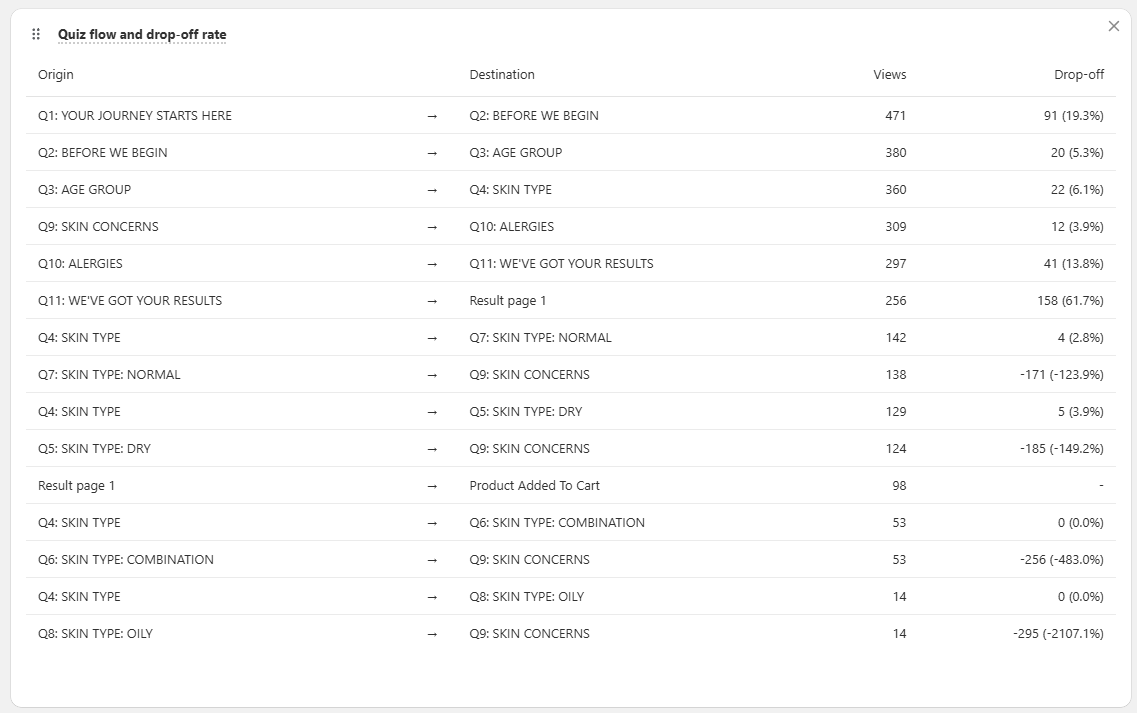
The metrics to check, in order:
| Metric | What it tells you |
|---|---|
| Start Rate | % of page visitors who actually start the quiz. Low start rate = CTA, quiz name, or visibility problem. Not a quiz content problem. |
| Completion Rate | % of quiz starts that reach the results screen. This is the number you're trying to move. |
| Per-Question Exit Rate | Drop-off % at each question. This tells you exactly where to focus. |
| Average Time Per Question | Spikes (2-3x longer than other questions) signal confusion or a question that feels too personal or demanding. |
| Lead Capture Rate | % of completers who provide an email. A sharp drop here indicates friction at the email step specifically. |
Drop-off formulas
- Overall drop-off rate:
(Quiz Starts - Quiz Completions) ÷ Quiz Starts × 100 - Per-question drop-off:
(Users at Question i - Users at Question i+1) ÷ Users at Question i × 100 - Completion rate:
Quiz Completions ÷ Quiz Starts × 100
You can also check the Selected Choices breakdown to see which answer options are confusing customers - if one choice in a question gets almost zero selections, it may be poorly worded or redundant.
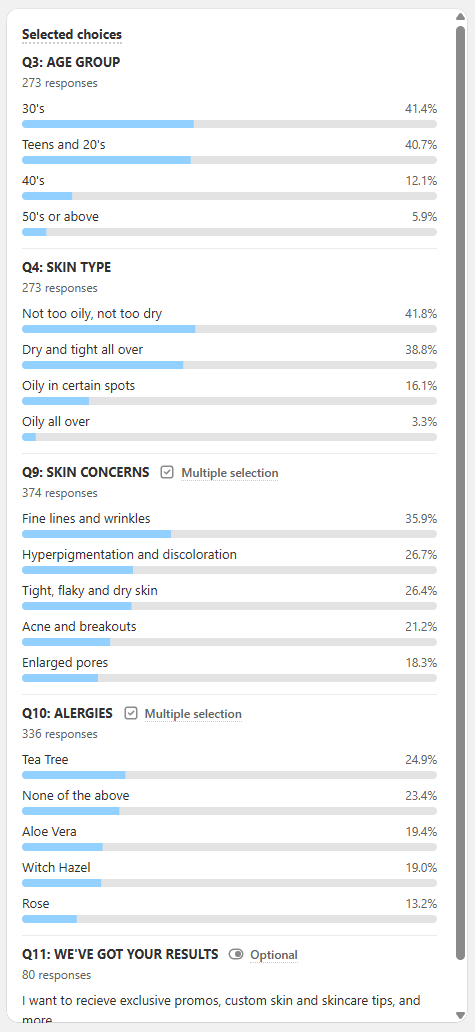
Once you know which question is the problem, use the strategies below to fix it.
Fix the drop-off
Make the value obvious before question one. The most impactful moment in the quiz isn't a question - it's the welcome screen. Customers decide whether the quiz is worth their time within the first 5 seconds. If your welcome screen doesn't clearly communicate what they'll get and how long it takes, they leave before starting.
A strong welcome screen does three things:
- States the outcome: "Get your personalized skincare routine" not "Take the quiz"
- Sets time expectations: "8 questions, 2 minutes"
- Mentions the reward: "Complete the quiz and get 10% off"
If your quiz doesn't have one yet, see how to add a welcome screen.
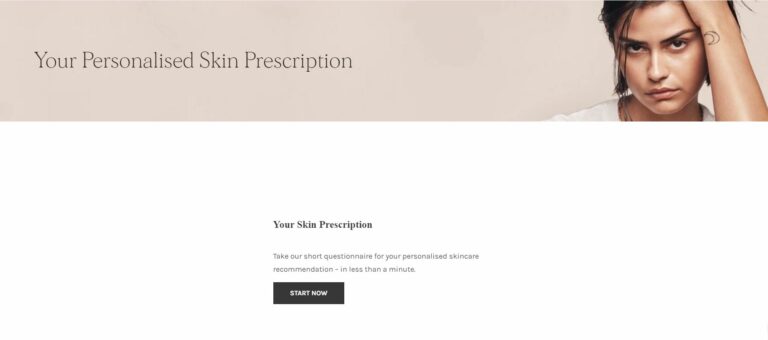
Also rethink your quiz name if it's generic. "Skin Diagnostic", "Routine Builder", "Shade Finder" communicate a professional, useful tool. "Quiz" communicates nothing.
Fix the length first. If your completion rate is low across the entire quiz (not just at one specific question), the quiz is probably too long.
The sweet spot is 6-12 questions, with 7-8 being the most common length for top-converting quizzes. Every question you add is a chance for a customer to leave. Apply one rule ruthlessly: if removing a question wouldn't change any recommendation, remove it.
Don't default to branching logic to 'fix' a long quiz
A common instinct is to add Jump Logic or Skip Logic so each path feels shorter. This can help in specific cases (genuinely separate product lines, like cat vs. dog products) but adds complexity that can itself cause confusion. The better first move is to cut questions from a linear quiz until every remaining question changes the recommendation. Start linear. Add logic only when a linear quiz genuinely can't serve the range of customers.
Rewrite questions customers hesitate on. The per-question exit rate will show you the specific question causing problems. Once you know which one it is, diagnose why:
- Is it confusing? Customers shouldn't need to think. If they can't answer in under 5 seconds, rewrite it in simpler terms or add a visual.
- Does it use jargon? Avoid brand-specific or technical terms your customers may not know.
- Is it too personal? Questions about budget, age, or health conditions can cause hesitation. Frame them around the outcome they enable ("To recommend the right strength") rather than the data point you're collecting.
- Does it have too many choices? Stick to 3-6 options per question. More than 6 causes decision fatigue.
- Is there no "I'm not sure" option? If customers might genuinely not know the answer, add a neutral fallback option that maps to a sensible default.
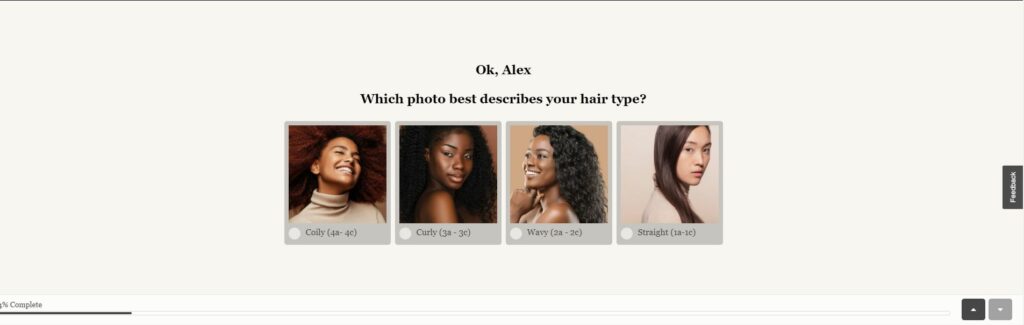
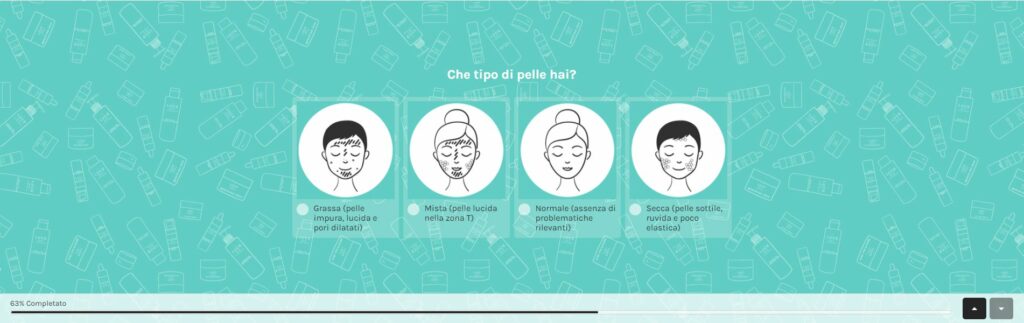
Use picture questions where the answer is genuinely visual - skin tone, hair texture, shade matching. They reduce guessing and wrong answers, which means better recommendations and higher completion.
How to add a Picture Choice question
In the Quiz Builder, click + Add question and select Picture Choice to show image options alongside text. See: Question Types
Order questions to build momentum. The sequence of questions affects how many people push through to the end. Structure your quiz so it:
- Starts with the easiest, most engaging questions - visual choices, simple preferences, non-personal
- Progresses toward more specific or personal questions - by the time you ask about budget or health goals, the customer is already invested
- Puts the email question last or second-to-last - not at the start, where it feels like a data grab before you've delivered any value
Get the email step right. The email question is typically the highest drop-off point in any quiz. How you handle it matters.
Make it required. Platform data shows that 75% of top-converting quizzes that collect email make it required - and this does not hurt overall conversion rates. Customers who reach the email step are engaged; they're willing to share their email in exchange for a good recommendation. The concern that requiring email "kills completions" is not supported by the data.
What does cause drop-off at the email step is making it feel like a data grab with no obvious benefit. Fix this with:
- A clear incentive directly next to the email field: "Get your results + 10% off your first order"
- Trust signals: "No spam. Unsubscribe anytime." or a privacy policy link
- Social proof if you have it: "Join 12,000 customers with a personalized routine"
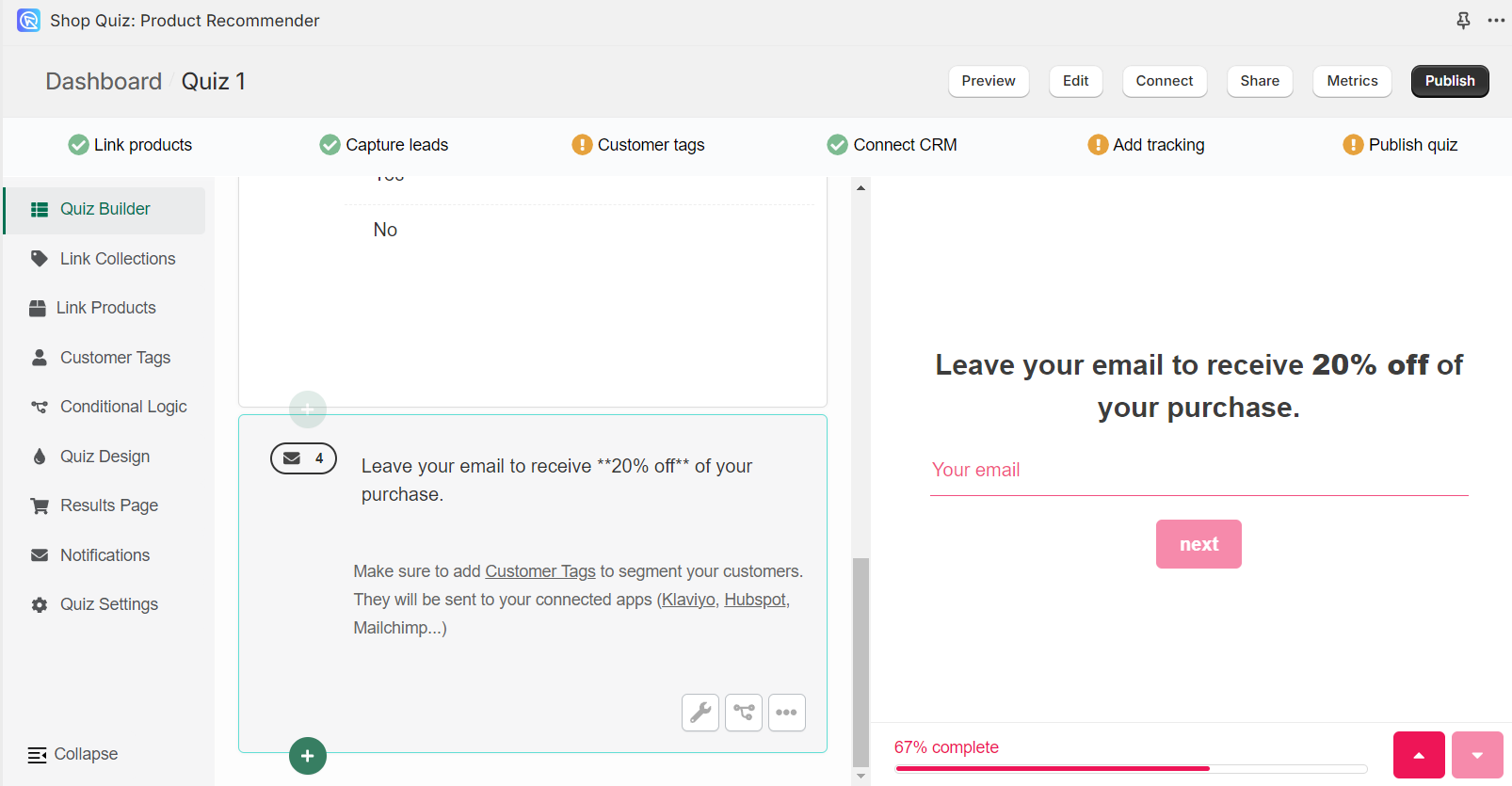
How to configure the email question
Fix generic results - they're a hidden drop-off driver. This one is less obvious but important: a customer who completes your quiz and receives a generic or irrelevant recommendation won't take the quiz again - and may leave without buying. The most common cause is unmapped answer choices.
If your answer choices aren't connected to products or collections, the recommendation engine has no signal to work with. The result is weak, generic results that don't feel personalized - and customers feel the quiz was a waste of their time.
Check before you launch: go through every answer choice in your quiz and ask: does this answer push the recommendation toward the right products? If any answer is unmapped, fix it.
A quiz with fully mapped answers produces tight, accurate recommendations. Those convert. See: How to recommend products
Keep the results page focused. A strong results page closes the sale. A weak one undoes everything the quiz just built.
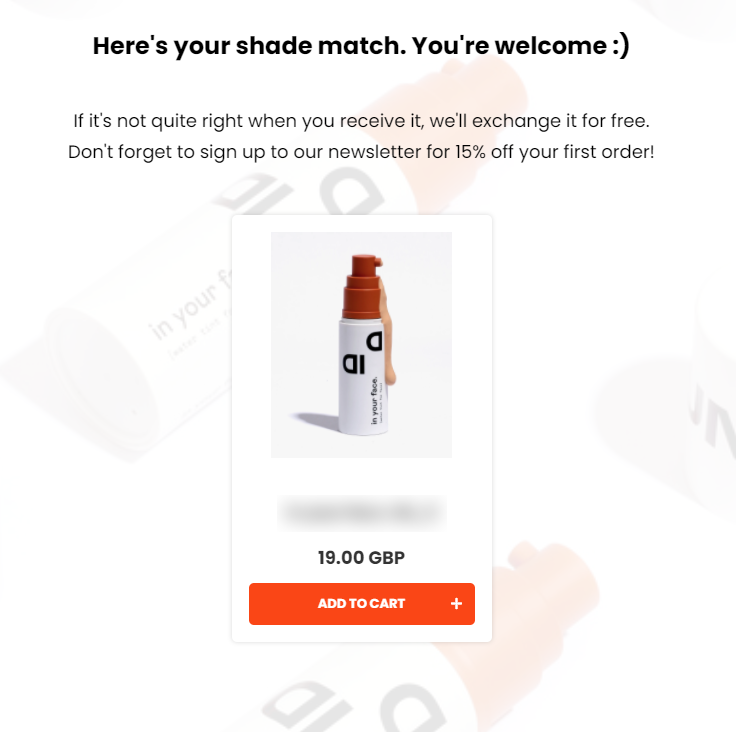
- Recommend 1-3 products maximum (or one per slot for routines)
- Place the products and add-to-cart buttons above the fold
- Include a discount code if the customer earned one
- Remove distractions: hide popups, chat overlays, and promo banners while the quiz is active
Reduce visual friction while the quiz is running. Competing UI elements during the quiz increase abandonment. When a customer is mid-quiz:
- Pause other popups: hide newsletter popups, live chat, and cookie banners
- Show progress clearly: "3 of 8" is clearer than "37%" - keep the total consistent (don't add hidden steps mid-flow)
- Minimize the surrounding page: sticky headers, promo banners, and auto-playing carousels steal focus
Don't lose them on mobile. Most quiz traffic is on phones, and that's where friction hurts most. Before you launch, take the quiz on your own phone and fix what feels awkward:
- One screen per question. If a question needs scrolling on mobile, it has too many choices or too much text.
- Big, tappable choices, and picture questions over typing. Thumbs miss small targets, and nobody wants to type on a phone mid-quiz.
- Load fast. Heavy images, or an aggressive popup that fires before the page settles, cost you starts before question one.
- Mind the email step. On a phone the keyboard covers half the screen, so keep that screen clean with the incentive visible right next to the field.
A/B test your changes
Once you've identified the problem question and implemented a fix, test it. Create a copy of the quiz with the change applied and run both versions simultaneously. Compare completion rates after a statistically meaningful sample (at least a few hundred starts per version).
How to run an A/B test
Focus on one change per test. If you change three things at once, you won't know which one moved the number.
Common things worth testing:
- Welcome screen copy (with vs. without time estimate; with vs. without discount mention)
- Quiz length (8 questions vs. 6 questions)
- One rewritten question vs. the original
- Email required vs. email with skip option
- Number of products on the results page (1 vs. 3)
Continuously improve
Drop-off optimization is not a one-time task. Run a review whenever you:
- Add or remove products from your catalog (check that answer mappings are still accurate)
- Change your quiz questions
- Notice a drop in completion rate in your analytics
Connect your quiz to Google Analytics 4 for deeper behavioral analysis - session length, page interaction, and funnel visualization beyond what the in-app metrics show.
Set a baseline, then track it
Note your current completion rate before making any changes. Every optimization you make should be measured against that baseline. Aim for 60-70%+ completion rate as a healthy target for a 7-8 question quiz.
The most impactful fixes, ranked
- Shorten the quiz - cut any question that doesn't change the recommendation
- Rewrite the one question with the highest per-question exit rate
- Map all unmapped answer choices to products
- Improve the welcome screen - clear outcome, time estimate, reward
- Add a discount incentive paired with the email step
Do / Don't
- Do find the exact drop-off point in the metrics before changing anything, then fix that specific question.
- Do make the value obvious on the welcome screen (outcome, time estimate, reward) and keep the quiz to 6-12 questions.
- Do require the email, but pair it with a clear incentive and trust signals.
- Do test the quiz on your own phone and fix mobile friction. Most takers are on a phone, and that's where the easy completions are lost.
- Don't add branching logic to "fix" a long quiz. Cut questions from a linear quiz until every one changes the recommendation.
- Don't run competing popups, chat, or banners while the quiz is active. They steal focus and increase abandonment.
Frequently asked questions
What is a healthy quiz completion rate?
Aim for 60-70%+ on a 7-8 question quiz. A well-built quiz finishes around 70% of the people who start it.
Where do most people drop off?
Usually the email step, or an overly long or confusing question. The per-question exit rate in the metrics shows you exactly where.
How do I cut drop-off fastest?
Shorten the quiz, rewrite the question with the highest exit rate, and make the welcome screen's value obvious before question one.
Why do people drop off on mobile?
Usually long questions that force scrolling, small tap targets, slow loading, or a cramped email step where the keyboard hides the incentive. Most quiz traffic is mobile, so take the quiz on your own phone and fix what feels awkward.
Related articles:
- Why your product quiz is not converting well
- How to get more people to take your quiz
- Product Quiz Metrics: What to Track to Convert Better
- Quiz Setup Checklist
This article explains where customers abandon a quiz, and what to change to raise your completion rate.