How to Migrate a Legacy Quiz to the 💎Built for Shopify App
If you have quizzes built in the original RevenueHunt app (Legacy), you can now import them directly into the 💎Built for Shopify version of RevenueHunt app instead of rebuilding them from scratch. The migration tool copies your questions, results pages, logic, and design settings in one click.
Shopify only
The Migrate from Legacy App option is currently available for Shopify stores only. Merchants on WooCommerce, Magento, BigCommerce, or Standalone can use the Import Quiz feature instead.
Before You Begin
- You must have the
💎Built for Shopifyversion of RevenueHunt app installed and active. If you haven't switched yet, follow the Install App guide. - Your legacy quizzes remain untouched — the migration creates a copy in the
💎Built for Shopifyapp. Nothing is deleted from the legacy version.
Step 1: Open the New Quiz Menu
- Open the RevenueHunt app in your Shopify dashboard.
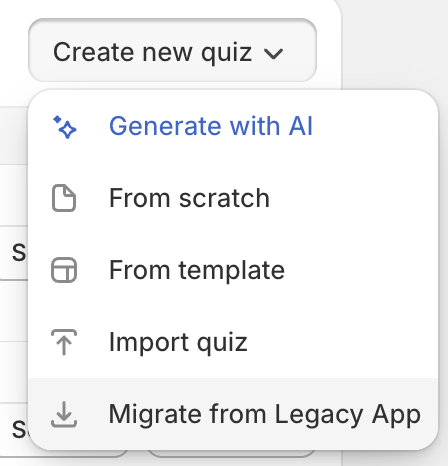
- From the Dashboard, click the Create new quiz button.
-
In the dropdown menu that appears, select Migrate from Legacy App.
Step 2: Select the Quiz to Import
A dialog will appear listing all quizzes from your legacy account. Each quiz shows:
- Name and basic stats (number of questions, results pages, last updated date)
- What will migrate — a green checkmark confirms that questions, results, logic, and design are included
-
Warnings — yellow notices flag anything that cannot be migrated automatically
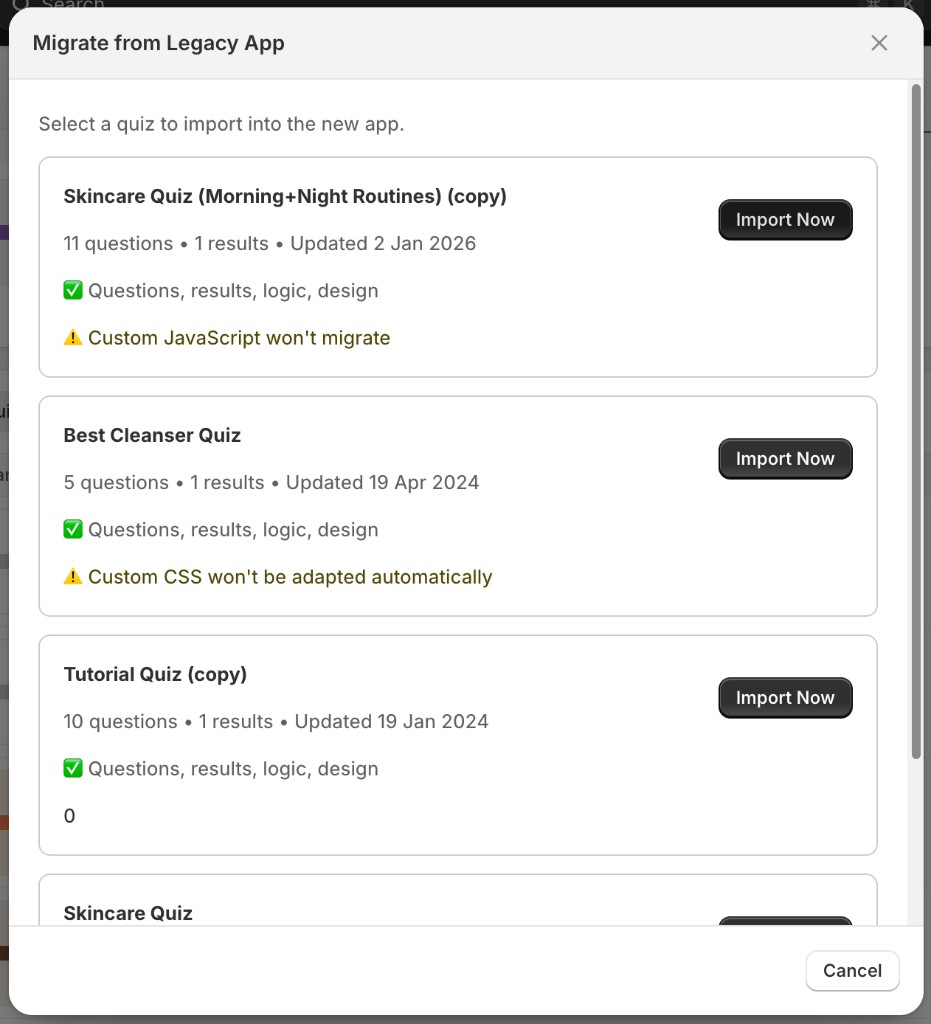
Click Import Now next to the quiz you want to migrate.
Step 3: Review the Imported Quiz
Once the import completes, the quiz opens in the Quiz Builder. Its name will include the suffix (Imported from V1) so you can easily identify it.
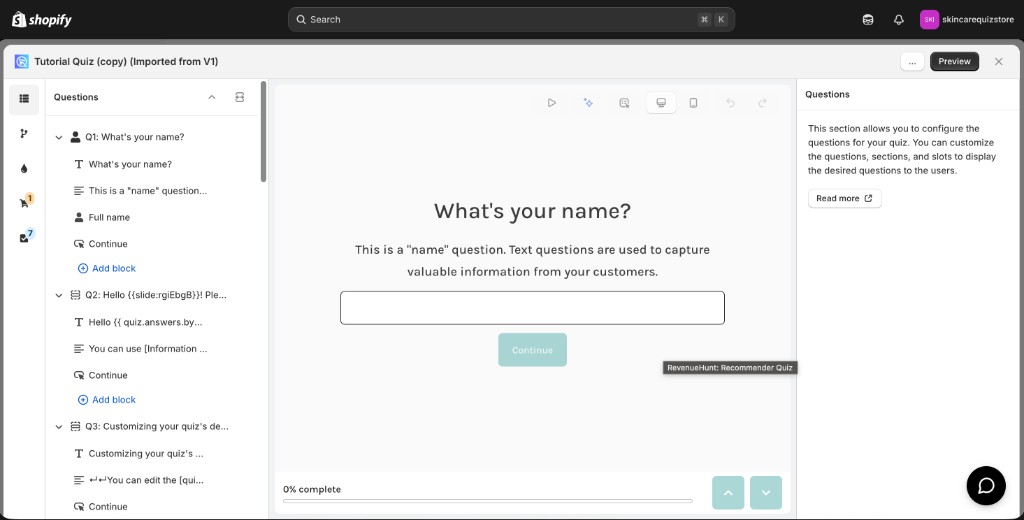
Review your questions, results pages, and logic to make sure everything looks correct before publishing.
What Gets Migrated — and What Doesn't
| What migrates | Status |
|---|---|
| Questions and answer choices | ✅ Fully migrated |
| Results pages and content | ✅ Fully migrated |
| Conditional / branching logic | ✅ Fully migrated |
| Quiz design and styling | ✅ Fully migrated |
| Custom CSS | ⚠️ Not adapted automatically — see below |
| Custom JavaScript | ⚠️ Will not migrate — see below |
| Special third-party integrations | ⚠️ Needs review after import |
| Product mappings | ⚠️ May need re-linking — see below |
What to Watch For After Import
Most quizzes migrate cleanly, but some advanced configurations require a manual follow-up.
Custom CSS
If your legacy quiz used custom CSS, the styles are carried over as-is, but the 💎Built for Shopify app uses a different HTML structure than the legacy app. CSS rules that targeted legacy elements may not apply correctly.
Review your design after import
Check the quiz preview after importing. If something looks off — wrong colors, broken layouts, missing fonts — you will need to update the CSS selectors to match the new structure, or rebuild the style using the Design editor.
Custom JavaScript
Custom JavaScript will not be migrated. The 💎Built for Shopify app has a different JavaScript API, so legacy scripts cannot be transferred automatically.
Rebuild JS customizations manually
If your legacy quiz relied on custom JavaScript (e.g., custom events, DOM manipulation, or callback functions), you will need to rewrite those using the JavaScript API.
Product Mappings
Questions, answer choices, and result pages migrate — but product links are tied to Shopify product IDs, which are the same across both app versions on the same store. Product mappings should transfer correctly for stores where the legacy app and the 💎Built for Shopify app are installed on the same Shopify account.
Tip
After importing, go to your results page and verify that the expected products are still linked. If any products appear missing or unlinked, re-add them using the Results Page editor.
Special Integrations
Connections to third-party tools (Klaviyo, Mailchimp, webhooks, etc.) are not automatically re-established after migration. Reconnect any integrations you need through Quiz Settings.
After the Import
Once you've reviewed the quiz and fixed any warnings:
- Test the quiz end-to-end using the Preview button before publishing.
- Reconnect integrations (email platforms, CRMs, pixels) in Quiz Settings.
- Publish the quiz using your preferred publishing method.
- When you're happy with the result, you can safely archive or delete the legacy version.
The base quiz is always importable
Even if your legacy quiz has custom CSS, JavaScript, or unusual configurations, the core content — questions, logic, and results — will always import successfully. The warnings only indicate which advanced features need a manual finishing touch, not that the import will fail.
Related articles: