How to Recommend Sizes Based on Measurements
Recommending a size, for bras, clothing, footwear or any fit-based product, needs a structured approach. This article explains why an open-ended measurement field cannot work. It then covers how to design questions that return an accurate size, and what to do when you need a precise calculation.
Why open-ended questions do not work
You might ask the customer to type an exact measurement: "Enter your underbust measurement in inches". Using that number to return a size does not work, because an open-ended Number question cannot carry product recommendations.
The recommendation engine links each choice to a fixed list of products. When a customer picks that choice, every product in the list receives one upvote. The product with the most upvotes at the end is recommended.
A typed number cannot be linked to anything in advance. A customer can enter any value, so there is no product list to attach to it. The upvoting system has nothing to count.
The same applies to any question whose answer you cannot predict: exact measurements, dates and free text. Every possible answer has to be one you defined before the quiz went live. See how to recommend products based on numerical inputs.
Use ranges instead of exact numbers
Replace the measurement field with a dropdown or multiple-choice question. Instead of asking for an exact number, offer predefined measurement ranges as the choices.
Bra size quiz
Instead of "Enter your underbust measurement", use a dropdown:
- Under 27" / Under 69 cm
- 27-28" / 69-71 cm
- 29-30" / 74-76 cm
- 31-32" / 79-81 cm
- 33-34" / 84-86 cm
- 35-36" / 89-91 cm
Each choice maps to a fixed band size. You can then upvote every product variant with that band from the choice.
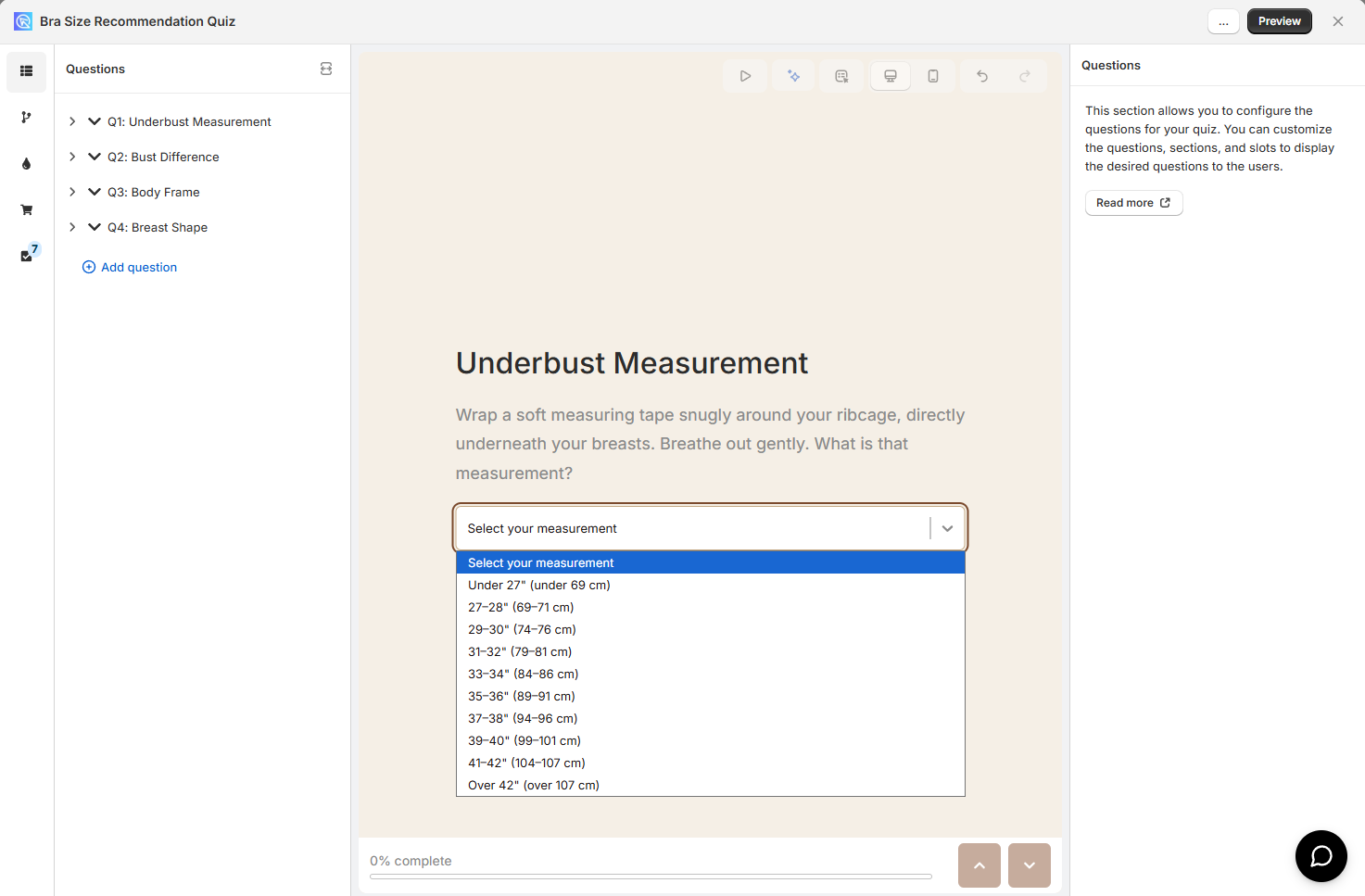
Once the choices are finite, you can:
- Upvote products, variants or collections from each choice
- Set up Jump Logic or Display Logic from what the customer picked
Quiz Copilot can generate the choices
In the Built for Shopify version, open Quiz Copilot from the quiz editor and give it your product list and your sizing logic. It writes the choices for you, which saves a lot of typing when you carry many size variants.
Map out your products before you start
Every choice needs a pre-written list of product variants, so you have to know your full size catalog before you build a single question. The quiz assigns upvotes at setup time, not when a customer answers. You cannot assign products to a choice that does not exist yet.
Before you open the quiz builder:
-
List every size variant you carry. For a bra shop, that runs from 28A and 28B through to 44DD.
-
Work out which attributes decide the size. Bras use band and cup, clothing uses waist and hip, shoes use length and width.
-
Design one question per attribute. The choices have to cover the full range of your catalog.
-
Write down which product variants each choice upvotes.
An AI assistant can generate the mapping
Mapping many size variants by hand is tedious. Share your full product list with an AI assistant such as ChatGPT, Claude or Gemini, and ask it to generate the mapping.
Try a prompt like this:
"I sell bras in these sizes: [paste your size list]. I have two quiz questions: underbust measurement and bust difference. For each dropdown choice, list every product variant that should receive an upvote."
Add a tiebreaker question
Two well-designed measurement questions produce a clear winner in most cases, but not always. When a customer's measurements sit exactly on the boundary between two sizes, two products can finish on the same upvote count. Without a tiebreaker, the result is arbitrary.
A tiebreaker question needs two properties:
- Its answer is independent of every other question. It describes something about the customer that holds whatever their measurements are.
- Its product list is fixed. It never changes with what the customer answered elsewhere.
Body frame as a tiebreaker
For a bra quiz, "How would you describe your overall body frame?" works well:
- Petite or small frame: upvotes every 28, 30 and 32 band size
- Average or medium frame: upvotes every 32, 34 and 36 band size
- Athletic or muscular frame: upvotes every 34, 36 and 38 band size
- Plus or fuller frame: upvotes every 38, 40, 42 and 44 band size
These lists are written in advance and never change. The question can be answered without knowing any of the customer's measurements.
Avoid a question whose answer depends on another question
"Does your current bra band feel too tight?" looks useful. Acting on it, by adding an upvote to the next band size up, means knowing what the first question answered. That is logic, not a static list, and the upvoting system cannot do it. A tiebreaker has to be answerable on its own, with the same product list for every customer who picks that choice.
Alternative: custom JavaScript calculation
The upvoting approach may not be precise enough when your sizing logic needs exact formulas. Custom JavaScript can calculate the result on the results page instead.
JavaScript takes the typed measurements from a Number question, applies any formula or condition, and shows a calculated result. That result can be a recommended product, with no upvotes involved.
See how to add JavaScript to the quiz for the full documentation, including a worked calculation.
Custom JavaScript needs a paid plan
Custom JavaScript does not run on a live quiz on the Free plan. You can still test it in the preview and inside the quiz builder. See Feature availability for paid-only options, or view the pricing and plans.
On a paid plan? Quiz Copilot can write the code
You do not have to write the JavaScript yourself once your size mapping is ready. Open Quiz Copilot from the quiz editor and give it your product list and sizing logic. Ask it for a JavaScript block that reads the measurement answers and returns the right size.
Copilot produces ready-to-paste code. You can ask it to handle edge cases, out-of-stock fallbacks or sister size suggestions, in plain language.
Available on every plan
Custom JavaScript runs on every plan in this version, but there is no Quiz Copilot to write it for you.
Available on every plan
Custom JavaScript runs on every plan in this version, but there is no Quiz Copilot to write it for you.
Available on every plan
Custom JavaScript runs on every plan in this version, but there is no Quiz Copilot to write it for you.
Available on every plan
Custom JavaScript runs on every plan in this version, but there is no Quiz Copilot to write it for you.
Available on every plan
Custom JavaScript runs on every plan in this version, but there is no Quiz Copilot to write it for you.
This article explains how to recommend sizes based on measurements using the quiz upvoting system.